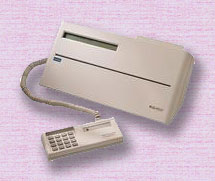
 Dirty Reader / Writers can lead to misreads, premature headwear, down time and patient dissatisfaction. In the event of a malfunctioning Reader / Writer, there are a few simple steps that will help get you back on track. Dirty Reader / Writers can lead to misreads, premature headwear, down time and patient dissatisfaction. In the event of a malfunctioning Reader / Writer, there are a few simple steps that will help get you back on track.
A can of compressed air is the first step. This is used to clean dust from the environment that collects in the Reader / Writer's transport. To clean the transport, liberally spray the air across its full length, holding the can upright to prevent moisture from entering the Reader / Writer. The cleaning frequency will depend upon the use and the environment where each Reader / Writer is located.
It is recommended that the transport be cleaned at least once a week.
The next step is troubleshooting.
- Check all connections to the Reader / Writer and PC. Also make sure that the power cord is properly attached.
- Check power. Turn Reader / Writer off; wait 5 seconds and power unit back on. When Reader / Writer powers back up, you should see a "welcome" message on the display for 3 seconds.
- Check the card. At times, an HCS Health Card may become damaged and unreadable. Try to read the card in a known working device. If the card cannot be read, place it aside and try to read a new card.
- Try the malfunctioning Reader / Writer at a known good station. If the problem does not re-accrue then the problem is not with the Reader / Writer but the station where it was located.
If there is no resolution then gather the following information and contact Technical Support.
- Symptoms of the problem.
- When does the problem occur?
- When was the problem discovered?
- Reader / Writer serial number. (Located on the bottom of the unit)
Call Health Card Solutions' Technical Service at (651) 257-3030. A technician will assist in diagnosing the problem. If the Reader / Writer needs to be sent in back for professional cleaning, the technician will give you shipping instructions.
Ship the Reader / Writer in a static shield bag, insert it between the original foam ends, and place it in the original shipping box. Use second day air service when shipping to avoid damage. |